
Convert Handwriting to Text
Pen to Print's handwriting to text converter is built to handle real handwriting — neat, cursive, or messy. Plain or structured pages that others get wrong.
Upload any scan, image, or PDF and get clean, editable text back — with layout and formatting preserved.
START FREE 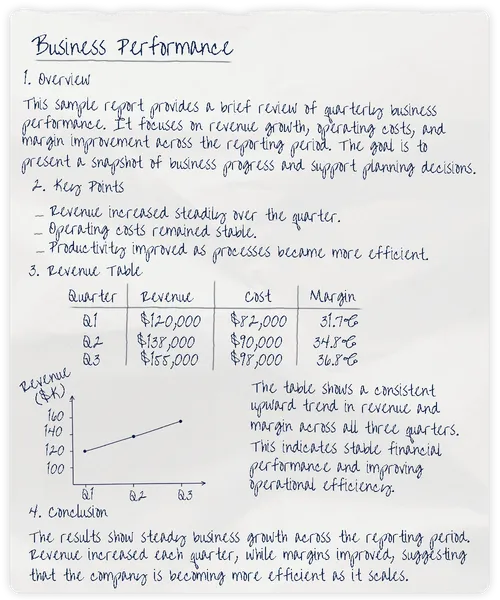
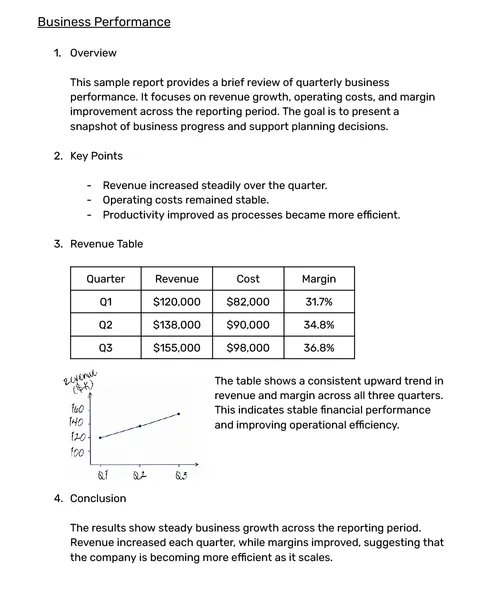
Handwriting to text conversion uses AI-powered OCR to turn handwritten notes, images, scans, and PDFs into editable digital text. Pen to Print is built for the real variability of human writing — neat, cursive, or messy — and handles many document types and layouts, from notes and forms to tables, math equations, and mixed content.
- Handwriting to Text
- Handwriting OCR
- Scan to Text
- Cursive Reader
Trusted by businesses and individuals as the go-to handwriting to text converter
From Basic to Advanced
Handwriting to Text
Pen to Print goes beyond basic handwriting OCR with advanced AI-powered handwriting recognition, built for handwritten documents where preserving layout, formatting, inline images, tables, and math equations matters just as much as reading the text.
Convert Handwriting to Text in Three Steps
Turn handwritten images and PDFs into editable text in three simple steps.
Upload Handwriting & Convert
Upload your handwritten notes, images, or PDFs, then start the conversion in a click.
Review the Converted Text
Review the converted text side-by-side with the original scan. Verify accuracy before downloading the editable file.
Export to Word or Text
Copy your text, download it as TXT, or export it as a fully formatted Word document.
Built to Handle Handwriting That Others Can't
Pen to Print is designed for handwriting, unlike most OCR tools. It handles the full range of human writing — neat, cursive, and messy — and is built for the document complexity others miss: tables, math equations, mixed layouts, and structured forms.

Reads the handwriting others miss
Cursive, rushed scrawl, illegible and messy notes — Pen to Print handles the challenging handwriting that other tools often misread and get wrong.

Preserves your document, not just your words
Rebuilds headings, lists, tables, inline images, and math equations in a structured Word file — not a wall of pasted text.

Outputs that fit your next step
Word, Text, Excel, LaTeX, searchable PDF — your converted file lands in the format your work actually requires.

Fits the way you work
Use Pen to Print online for quick jobs, mobile for on-the-go, desktop for high-volume batches, email for automation, API for integration.
Handwriting to Text
Wherever You Work
Use Pen to Print online, on mobile, on desktop, by email, or through the API with the workflow that fits your needs. The same handwriting-to-text engine supports quick personal use, recurring business tasks, and higher-volume processing.

ONLINE
Convert handwriting to text online from notes, images, scans, and PDFs. Use dedicated tools for plain text, formatted documents, tables, forms, and math with no installation required.
TRY IT FREE
MOBILE
Convert handwriting from photos and scans to text, Word, or searchable PDF from your phone, wherever you work.
GET IT NOW
DESKTOP
Process handwriting to text at scale on Windows and Mac. Convert multi-page PDFs, batches of scanned images, and full folders with a workflow built for volume.
DOWNLOAD NOW
Send scanned handwritten documents by email and receive text or Word files back automatically in your inbox.
START EMAILING
API
Add handwriting-to-text conversion to your own apps and workflows through a REST API built for automated processing.
BUILD WITH API Specialized Tools for
Complex Handwritten Documents
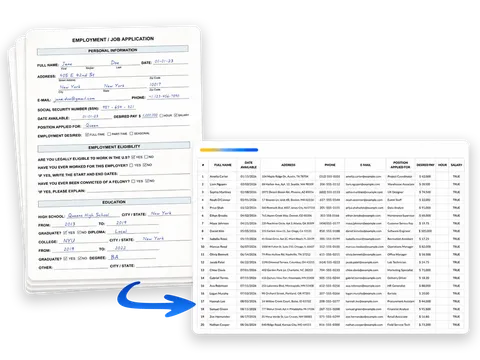
When your handwritten documents need more than editable text, use specialized tools built to turn math into LaTeX, tables into Excel, scans into searchable PDFs, and extract data from structured forms into Excel.




Form Data Extraction
Automatically extract handwritten field values from forms, invoices, timesheets, and structured documents into clean, editable, structured data — saving hours of manual entry.
When Handwriting-to-Text Actually Works, People Notice
Professionals and teams processing documents, students digitizing lecture notes, teachers grading assignments, researchers archiving handwritten records — people who needed it to work, and it did.
"Amazing! I couldn't believe this was even possible. I've transcribed notes that I couldn't even read myself and the app turned it into clear text."

S. Markovic, Google Play
"We use Pen to Print to convert delivery notes and handwritten tables to Excel and Word. It's fast, accurate, and saves us hours of manual typing."
L. Reyes, Logistics Coordinator
"A quick scan with my phone and POW! My scrawl turns from image to text. It's magic!"
B. Zook, App Store
"Pen to Print helps us digitize invoices and customer orders from scanned PDFs. Exporting handwritten PDFs to Word or Excel while maintaining layout is a game changer."
M. Patel, Office Manager
"Grading handwritten assignments is so much easier now! I snap a picture, convert to text, and read effortlessly. Even cursive is recognized well."
S. Langford, School Teacher
"My mind is blown, sometimes I can't read my own writing but this did - the very first time."
T. Smart, App Store
"Pen to Print is a lifesaver. I convert handwritten math notes - equations, formulas, tables - into editable text. Exporting to LaTeX makes reviewing so much easier."
A. Jennings, Student
"It's remarkably accurate, reading my scribble cursive and interpreting it with 98% accuracy... Better than most humans trying to read it!"
W. Tigress, Google Play



"I chose your app after trying about a dozen different cursive-to-text converters. Yours handled it far better — even diary pages barely readable with the naked eye came back about 95% correct."
How do I convert handwriting to text online?
Can Pen to Print read cursive and messy handwriting?
What is handwriting recognition?
What’s the difference between Basic and Advanced handwriting-to-text conversion?
Is Pen to Print available beyond the online handwriting-to-text tool?
Which tool should I use for complex handwritten documents?
What formats can I export my converted files to?
Is my data secure and private?
Is there a free version or trial available?
Cursive Reader: Translate Cursive to Text
Convert cursive, messy, and illegible handwriting into clear, readable digital text.
Read more
Handwriting OCR: Convert Handwriting to Word or Text
Convert handwritten notes, images, and PDFs into editable Word or text files.
Read more