


Cursive Reader: Translate Cursive to Text

Convert cursive, messy, and illegible handwriting to digital text so it's clear and easy to read — let our handwriting OCR tools do the heavy lifting and decipher, decode, and translate it for you.

Start Reading Cursive

Reading cursive and messy handwriting is slow, frustrating, and often inaccurate, especially when every writer has a different style. Pen to Print solves that by using AI-powered handwriting OCR to decipher handwritten notes, scans, and PDFs into clear, editable digital text.

  • Cursive Reader
  • Messy Handwriting
  • Cursive to Text
  • Decipher Cursive
  • Cursive Translator
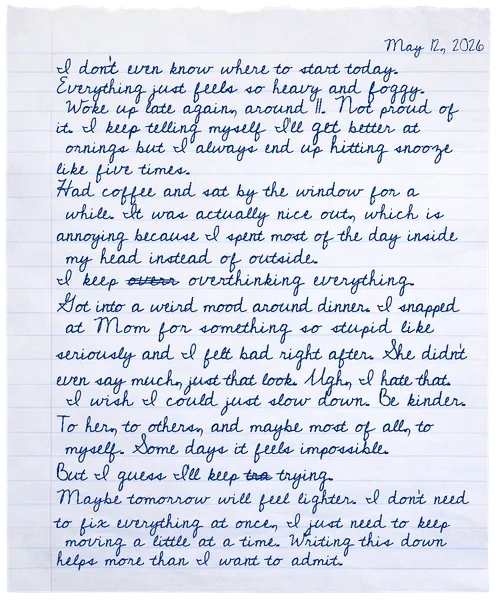
Input · cursive handwriting
Cursive handwriting sample
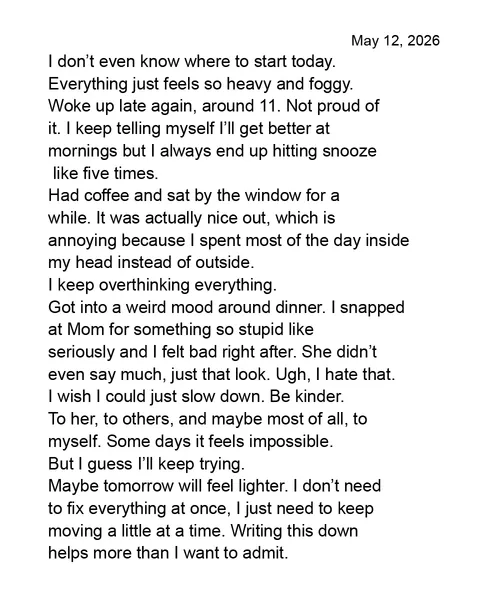
Output · readable & editable text
Cursive handwriting converted to readable and editable digital text

Trusted as the leading cursive reader

3.5M+
Customers
30M+
Pages Converted
98.2%
Word Accuracy
Platforms & Workflows

Read Cursive Handwriting on Every Platform

The cursive reader runs on every platform — online for everyday use, mobile for on-the-go capture, desktop for high-volume batches, email for hands-off processing, and API for embedded workflows.

Online
Online

Online tools to convert cursive and messy handwriting to text — with dedicated workflows for notes, tables, forms, and math. The cursive reader is built into every online tool, and you can download as Word, text, Excel, LaTeX, or searchable PDF. No installation required.

Try It Free
Mobile
Mobile

Snap a photo of cursive, messy, or illegible handwriting and convert it to text or Word from your phone. The cursive reader works anywhere — iOS or Android.

Get It Now
Business Plan
Desktop
Desktop

Run high-volume cursive and handwriting processing on Windows or Mac — built to convert multi-page PDFs, batches of scanned images, and full folders. The cursive reader scales to entire archives in a single batch.

Download Now
Business Plan
Email
Email

Send scanned cursive or handwritten documents to a dedicated email address and get Word and text files back automatically. The cursive reader works inside your existing email workflow — no app to install.

Start Emailing
API
API

Embed the cursive reader and our handwriting OCR engine in your own applications through a REST API. Process cursive, messy, and illegible handwriting at scale with the same accuracy as Pen to Print's tools and apps.

Build with API
The Challenge

Reading Messy Handwriting Is Hard. Reading Cursive Is Harder.

Personal style, mess, and unfamiliar scripts turn every page into its own puzzle.

Reading people's handwriting can be a difficult task, particularly when it comes to cursive. Decoding handwritten notes presents a significant challenge, as handwriting can often appear messy or illegible, with each person's style adding to the complexity. This struggle is magnified with cursive writing, as it is notoriously harder to read and understand. Whether it's someone else's writing or your own, reading lengthy handwritten documents takes far longer than digital text — and often involves misunderstandings.

Almost everyone hits this wall:

Teachers

Grading stacks of student work where every student has their own style, quirks, and legibility.

Students

Borrowing class notes and trying to decode a classmate's unfamiliar handwriting.

Healthcare

Patient notes handed off shift to shift, where the next person can barely read them.

Business

Retyping handwritten invoices and meeting notes by hand.

Archivists

Old letters and journals full of beautiful but slow-going cursive.

Family

Decoding a grandparent's letter, a recipe card, or a parent's old journal.

Read It All

Built to Read Any Handwriting — Cursive, Messy, Complex, or Old

Pen to Print's cursive reader does the heavy lifting — deciphering, decoding, and translating any handwriting into clear, editable text.

This is where Pen to Print excels. Acting as a cursive translator, it makes every piece of handwriting easy to read — converting plain or cursive writing into clear digital text. It also manages every form of handwriting — neat scripts, messy scribbles, cursive flows, and flowing letters — and conquers even the most challenging or chaotic page.

Teachers save hours deciphering student work while grading. Students get the full value of their classmates' class notes without the hassle of decoding them. Healthcare staff hand off patient notes that the next person can actually read. Businesses cut manual data entry — invoices, quotes, and meeting notes become editable text in seconds. Archivists turn old letters and journals into searchable digital records. And at home, a grandparent's letter or a parent's old journal becomes something you can read, copy, and keep.

Cursive Handwriting

Neat, modern, rushed, or sloppy — every flavor of connected cursive. From careful school-style writing to a scrawled grocery list, the model reads the strokes.

Messy & Illegible Handwriting

Scribbled meeting notes, doctor's prescriptions, half-formed letters, late-night thoughts. The handwriting most people give up on — we convert it cleanly to editable text.

Complex Layout

Real-world handwriting comes with structure — sketches, tables, lists, multi-column pages. We transcribe the handwriting and preserve the layout, instead of flattening everything into one block of text.

Old Handwriting

Letters from a drawer, journals from decades back, faint ink or watermarked pages. The cursive reader extracts text even when the original has aged or the photo isn't perfect.

How To

How to Use Handwriting OCR as a Cursive Reader

Follow three simple steps to turn handwritten cursive into clear, readable and editable text.

1

Upload Your Cursive Handwriting

Drop in a scan, photo, or PDF of any handwritten document — even cursive, messy, or illegible.

2

The Cursive Reader Goes to Work

Pen to Print's AI-powered cursive reader deciphers, decodes, and translates the handwriting into clean digital text — preserving structure and layout.

3

Export Digital Text

Download the digitized content as Word, plain text, Excel, LaTeX, or a searchable PDF — ready to read, search, copy, and share.

How do I read cursive handwriting online?

Upload a photo, scan, or PDF of the handwritten page to Pen to Print. Our handwriting OCR reads cursive and messy handwriting, converts it into clear digital text, and lets you export it as editable text, Word, Excel, LaTeX, or a searchable PDF depending on the tool you use.

What is Pen to Print?

Pen to Print is the leading AI-powered handwriting to text platform, trusted by 3.5M+ users since 2018. It uses advanced handwriting OCR to digitize handwritten documents and allow legible reading of cursive and messy handwriting. It offers a wide toolkit for notes, math, tables, searchable PDFs, and data extraction — across web, mobile, desktop, email, and API.

Can the cursive reader handle handwritten business documents like invoices, forms, and complex notes?

Yes. Pen to Print's unique Cursive Reader is applied across all our tools and services, so you can integrate it in your business workflow for processing and digitizing cursive and messy handwritten invoices, handwritten forms, meeting notes, signed contracts, patient records, and applications. Available with batch processing, desktop app, email-in, and API on our offering for businesses & teams.

What's the difference between a cursive reader, cursive translator, and cursive decoder?

Most people use these terms interchangeably for the same job: turning handwritten cursive into readable text. Pen to Print's cursive reader does exactly that — it deciphers cursive writing and converts it into clear, editable digital text. "Cursive translator" sometimes implies language translation, but in everyday use it means transcribing cursive to text.

Is my handwriting private?

Yes. Files are encrypted in transit and deleted from our servers immediately after processing. We don't store, share, or use your content for training. See our Privacy Policy for details.

Is it free to try?

Yes! You can try Pen to Print with 10 free pages to explore how our handwriting to text process works and evaluate the accuracy of our handwriting OCR before upgrading. We offer a variety of cost-effective plans, for individuals, teams, and high-volume users — so you can choose what fits your needs best.