
Convert Handwritten Math Equations to Word and LaTeX
Digitize handwritten mathematical expressions and equations from scanned images or PDF to Word and LaTeX. Decipher complex scientific formulas into editable text with AI-powered OCR and avoid manual typing.
Start FreePen to Print's Math Converter converts handwritten math equations from scanned images or PDFs into editable Microsoft Word equations and LaTeX code. Its AI-powered OCR captures complex symbols, fractions, matrices, and integrals and converts them into editable digital format — no manual retyping in an equation editor required.
- Equations
- Formulas
- Symbols
- Matrices
- Integrals
- Fractions
- Math to LaTeX
- Math to Word
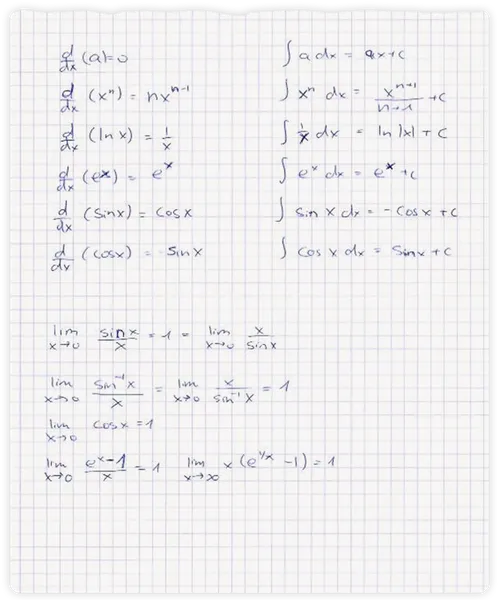
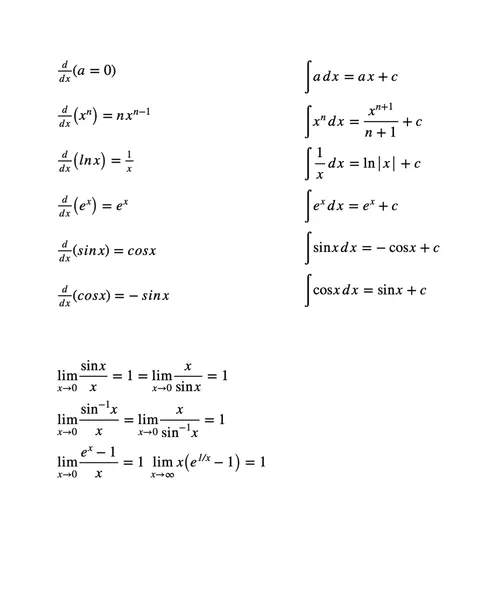
Generate Native Digital Equations
The Pen to Print Math Converter is a specialized OCR tool designed specifically for STEM students, educators, and researchers. Unlike standard text scanners, our advanced engine accurately maps complex mathematical structures - including matrices, integrals, fractions, and scientific symbols - ensuring your paper notes are flawlessly formatted for digital assignments and publications.

Convert Handwriting Directly to LaTeX Code
Manually typing out tedious LaTeX syntax is incredibly time-consuming. Simply scan your handwritten notes, and our engine instantly generates perfectly formatted LaTeX code, ready to be pasted directly into your research papers or assignments.

Export to Microsoft Word Equations
Bypass the slow and clunky Word Equation Editor entirely. Pen to Print converts your scanned math directly into native, editable Microsoft Word equations, allowing you to easily adjust and format your formulas on the fly.
How to Convert Handwritten Math to Word
Follow these three simple steps to digitize your mathematical expressions.
Scan Your Handwritten Equations
Upload a scan, image or PDF, of your handwritten math notes, equations, and formulas.
Process with AI-Powered OCR
Our system analyzes the scanned handwritten math and accurately recognizes the numbers, symbols, and structural layout.
Download in a Digital Format
Export the digitized equations directly to a Microsoft Word document or a LaTeX file.
How do I convert handwritten math equations to Word or LaTeX?
Upload a clear scanned image or PDF of your handwritten math equations to the Pen to Print Math Converter. The AI-powered OCR captures the numbers, symbols, fractions, matrices, and integrals on the page, then exports the result as native Microsoft Word equations or as LaTeX code.
Is my data secure and private when I use the Math Converter?
Yes. We take data privacy very seriously. Your files are encrypted during transit, and are deleted automatically from our servers immediately as the math conversion process is complete. We do not store, access, use, or share your content in any way — your data remains completely private and under your control. For more details, see our Privacy Policy.
Should I use the Math Converter or the Handwriting OCR for math notes?
Use the Math Converter when your page is mainly equations and formulas — it outputs native Word equations or LaTeX code, which is what you want for assignments, papers, and lecture notes. Use the Handwriting OCR when math is embedded in a longer block of text. It digitizes the whole page into Word with the equations rendered inline.
What kinds of math expressions does the Math Converter support?
The Math Converter handles standard arithmetic and algebra as well as more complex structures: fractions, exponents and subscripts, roots, summations and integrals, limits, matrices, Greek letters, and standard scientific symbols. Nested layouts are preserved in the output rather than flattened into linear text.
Can the Math Converter read messy or cursive handwriting?
Yes. Pen to Print's unique Cursive Reader is applied across all our tools, so the Math Converter stays accurate on both symbols and structure — even with rushed lecture-note handwriting or non-standard letter shapes.

Handwriting OCR: Convert Handwriting to Word or Text
Convert handwritten notes, images, and PDFs into editable Word or text files.
Read more
For Teachers: Read and Grade Student Handwriting Faster
Turn handwritten student work into readable digital text for efficient grading.
Read more