
Convert Handwriting to Word with AI-Powered OCR
Turn any handwritten image to text, or PDF to Word, with AI-powered handwriting OCR. Convert handwritten formatted text, inline images, tables, and math into a structured Word document.
Start Free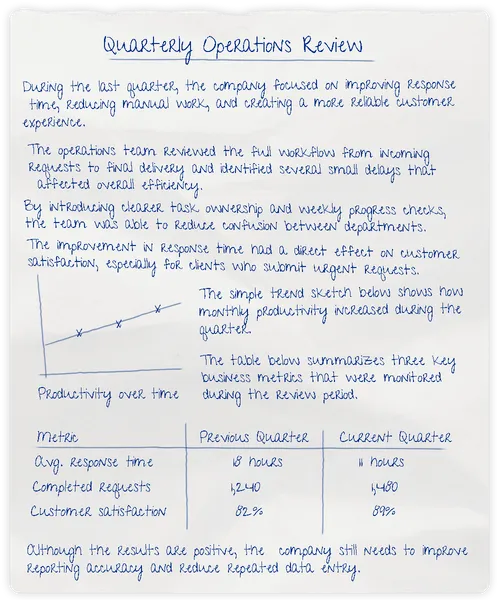
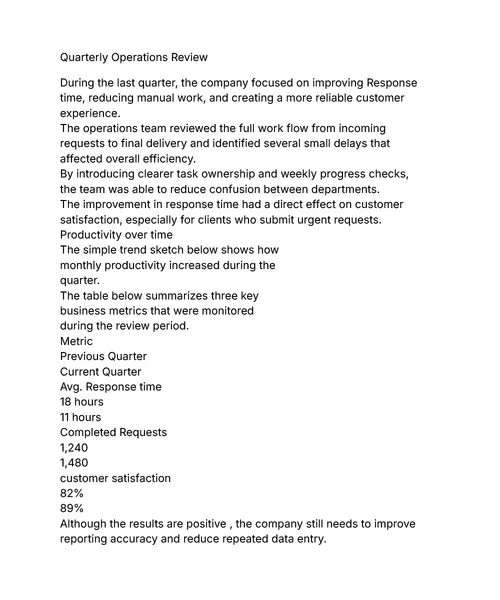
Pen to Print's Handwriting OCR converts handwritten images into editable text and turns handwritten PDFs into Word documents, so handwritten content can be edited, searched, shared, and stored properly. Choose Basic for converting handwritten notes to plain text. Choose Advanced for turning structured handwritten scans into Word documents.
- Hierarchy
- Layout
- Handwriting to Word
- Image to Text
- PDF to Word
Basic for Text, Advanced for Structure
The handwriting OCR tool offers two modes: Basic and Advanced.
Basic for plain-text transcription from handwritten image to text. Advanced to recreate layout, hierarchy, and inline elements from scanned handwriting to Word file.
Basic
All plansConverts handwriting into clean, editable plain text. Best for handwritten notes where text extraction is all you need.
Included in all plans
Advanced
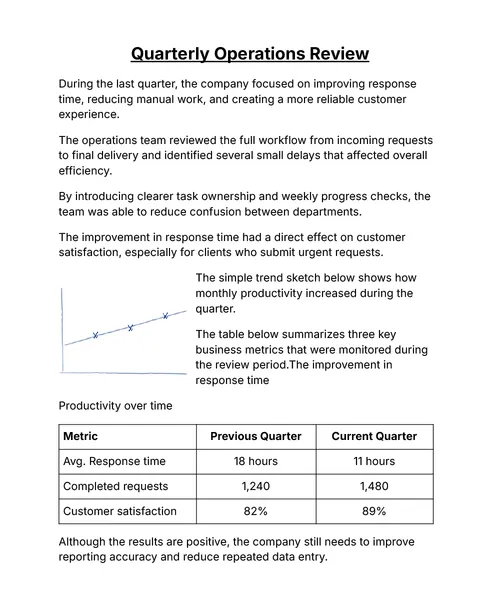
Premium plansRecreates the document — headings and hierarchy, bullet and numbered lists, bold and underline, inline images and sketches, hand-drawn tables, and math equations — in a Word file.
Included in All-inclusive & Business plans
Handwriting OCR that Digitizes More Than Just Words
Accurately transcribe every word and recreate the original document structure, including hierarchy, formatting, inline images, hand-drawn tables, and handwritten math equations.

Decipher Cursive & Messy Handwriting
Our AI-powered handwriting OCR accurately transcribes even the most challenging handwriting — messy notes, cursive, and other illegible writing — converting any handwritten image to text or PDF to Word with exceptional precision. This makes it a unique and effective handwriting decoder and a cursive reader for every need.

Recreate Layout, Hierarchy & Formatting
Use our handwriting OCR's Advanced mode to recreate complex handwritten layouts and text formatting in a digital file — titles, indented bullet points, numbered lists, underlined and bold text — so your extracted Word document maintains the exact hierarchy and structure of your original handwritten notes.

Carry Inline Images & Graphics
Sketched a diagram, graph, arrow, or drawing? The handwriting OCR engine recognizes graphic elements and carries them into your Word document as inline images — exactly as you drew them, exactly where they belong.

Digitize Handwritten Tables
Hand-drawn tables are detected and recreated as fully functional, editable Word tables, with no manual grid-building. For table-only pages or conversion to Excel, see the dedicated Tables Digitizer.

Convert Math Equations
Handwritten mathematical symbols, scientific formulas, and complex equations are easily converted into Word's equation editor. For equation-only pages or conversion to LaTeX, see the dedicated Math Converter.
Handwriting OCR Wherever You Work
Use our handwriting OCR on the platform that best fits your volume, needs, and workflow — on mobile, on desktop, through your email inbox, or via our developer API. Pick the entry point that works for you.

Mobile Apps
Capture handwritten notes on the go. Snap a photo of a whiteboard, notebook, or meeting minutes — the app fixes lighting and skew, then converts the handwritten image to text you can edit and share right from your phone.

Desktop App
Built for heavy-duty batch processing of handwriting to Word. The desktop app removes browser limits, letting you quickly process massive volumes of scanned images or large multi-page PDFs — ideal for archives and corporate document digitization.

Send scanned handwritten documents to a dedicated email address and automatically receive editable Word and text files back in your inbox. A frictionless handwriting OCR workflow for high-volume processing, scanner-to-email setups and teams that want to skip manual uploads.

API
Integrate our handwriting OCR engine directly into your product or enterprise workflow via REST. Power handwriting features in SaaS products, automate document digitization, or process bulk archives at scale — all with high-fidelity image-to-text and PDF-to-Word output.
How to Convert a Handwritten Image to Text
From any handwritten image or PDF to an editable Word document — in three steps.
Scan, Upload, Convert
Scan your handwritten notes, upload the images or PDFs (up to 50 pages at once), then convert.
Review and Verify Accuracy
Review the converted text side-by-side with the original scan. Verify accuracy before downloading the editable file.
Export to Word or Text
Copy to clipboard, download as TXT, or export as a fully formatted Word document.
What is handwriting OCR?
Handwriting OCR is optical character recognition built specifically for handwriting — not only printed text, as basic OCR does. Pen to Print's engine is designed and trained to transcribe any kind of handwriting, and even decipher challenging scripts like cursive or messy writing, which makes it a great cursive reader. It recognizes handwriting from any image or PDF, converts it to digital format, and exports it as editable text, Word, or TXT files you can search, share, and store.
How do I convert a handwritten image to text?
Upload your handwritten image (JPG, PNG), or a scanned PDF to the Handwriting OCR — the engine reads the handwriting, converts it into editable digital text, and lets you export as plain text, TXT, or a fully formatted Word document.
What's the difference between Basic and Advanced mode?
Basic mode converts handwriting to plain text or a clean Word document — ideal for notes, letters, journals, and long-form manuscripts. Advanced mode goes further: it preserves the original layout, rebuilding hierarchy, formatting, inline images, hand-drawn tables, and math equations inside a structured Word file. Pick Basic for plain transcription, Advanced when the layout itself matters.
Should I use the Handwriting OCR or the Tables Digitizer for handwritten tables?
Both tools handle handwritten tables, but each is built for a different use case. The Handwriting OCR is the right pick when a table is embedded in a longer block of text — it converts the whole page into Word and renders the table as a native Word table inside the surrounding text. The Tables Digitizer is purpose-built for pages that are mainly tabular, exporting your data straight into a spreadsheet — use it to convert full-page handwritten tables to Excel.
Should I use the Handwriting OCR or the Math Converter for math notes?
Use the Handwriting OCR when math is embedded in a longer block of text — it digitizes the whole page into Word with the equations rendered inline. Use the Math Converter when your page is mainly equations and formulas — it converts handwritten math equations to Word and LaTeX, which is what you want for assignments, papers, and lecture notes.
Is Pen to Print's handwriting OCR available beyond the online tool?
Yes — the same engine ships across multiple platforms. Capture handwritten notes on the go with the iOS and Android mobile apps, run high-volume batch processing on the Mac and Windows desktop app, set up a hands-off scanner-to-email workflow, or integrate handwriting OCR directly into your product through the developer API.
Is my data secure and private?
Yes. Files are encrypted in transit and deleted automatically from our servers as soon as the conversion completes. We do not store, access, use, or share your content in any way — your data stays under your control. For more details, see our Privacy Policy.

How to convert handwritten notes to text online
A step-by-step walkthrough for turning handwritten notes into editable text.
Read more
Cursive Reader: Translate Cursive to Text
Convert cursive, messy, and illegible handwriting into clear, readable digital text.
Read more