
Convert Handwritten Tables to Excel
Digitize handwritten tables, grids, lists, and key-value pairs from image or PDF to Excel and Word while preserving rows, columns, and layout with AI-powered OCR.
start freePen to Print's Tables Digitizer converts handwritten tables to Excel in seconds. Upload a scanned image or PDF, and its AI-powered OCR maps every row, column, and gridline exactly as written — then exports your tables to Excel spreadsheets or Word documents, with no manual rebuilding.
- Tables
- Lists
- Grids
- Key-value
- Table to Excel
- Table to Word
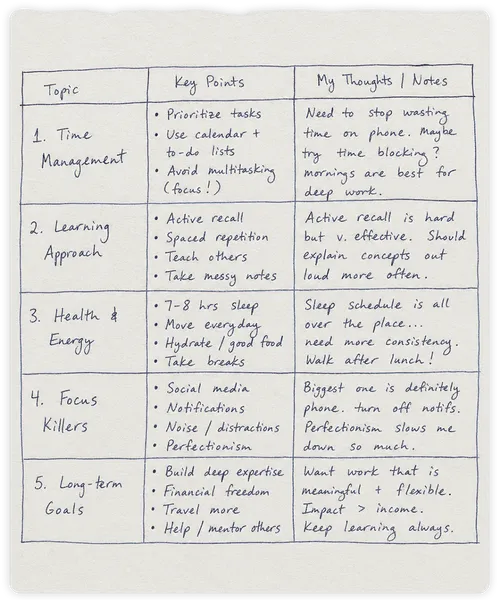
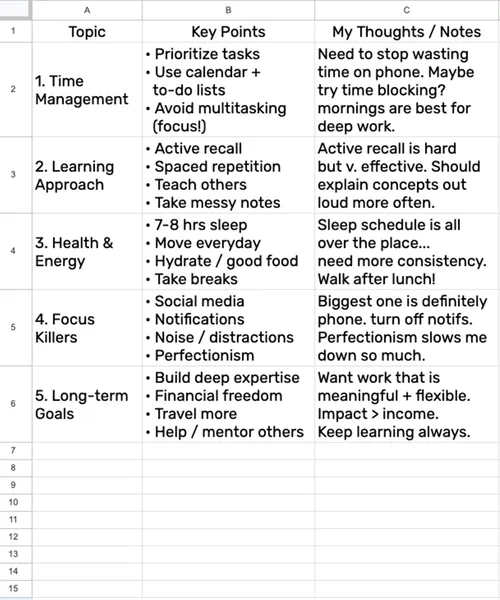
Preserve Table Structures with AI-powered OCR
Pen to Print's Tables Digitizer is specifically trained to recognize grid layouts, mapping your data exactly as it was written on the page and accurately converting your handwritten table to Excel or Word. This is a massive advantage over standard OCR tools that are designed to read standard sentences, which often scramble tabular data into a messy, unformatted block of text.

Digitize Handwritten Tables to Excel
No more wasting hours manually entering data into cells and rebuilding spreadsheets. Instantly convert handwritten financial grids, schedules, and statistical tables to Excel. Export perfectly mapped tabular data for immediate analysis.

Convert Handwritten Tables to Word
Not all structured data belongs in a spreadsheet. You can easily scan structured lists, tables, grids, and key-value pairs directly into seamlessly aligned Word documents, keeping your text perfectly organized without tedious manual formatting.
How to Convert Handwritten Tables to Excel and Word
Follow these three simple steps to digitize your structured data, from scanned handwriting to Excel or Word.
Scan Your Handwritten Table
Upload a clear scanned image, or PDF of your handwritten table, grid, or list.
Digitize Handwritten Tables with AI-Powered OCR
Our engine recognizes the text and structure, and converts them to digital format.
Download to Excel or Word
Export the formatted grid directly into a Microsoft Excel spreadsheet or Word document, ready for immediate use.
How do I convert a handwritten table to Excel?
Upload a clear scanned image or PDF of your handwritten table to the Pen to Print Tables Digitizer. The AI-powered OCR maps every row, column, and cell, then exports the result as an editable Excel (.xlsx) spreadsheet or Word (.docx) table, ready for analysis.
Is my data secure and private when I use the Tables Digitizer?
Yes. We take data privacy very seriously. Your files are encrypted during transit, and are deleted automatically from our servers immediately as the table digitization process is complete. We do not store, access, use, or share your content in any way — your data remains completely private and under your control. For more details, see our Privacy Policy.
Should I use the Tables Digitizer or the Handwriting OCR for handwritten tables?
Both tools can digitize handwritten tables, but each is built for a different use case. The Handwriting OCR tool is the right pick when a table is embedded in a longer block of text — it converts the whole page into Word and renders the table as a native Word table inside the surrounding text. The Tables Digitizer is built for pages that are mainly tabular and exports your data straight into an Excel spreadsheet or a standalone Word table.
Should I use the Tables Digitizer or the Form Data Extraction tool for handwritten forms?
Use the Form Data Extraction tool when you need to pull specific fields from a form — like an application or invoice where the field positions and labels are fixed and you want each field mapped to a column in Excel. Use the Tables Digitizer when your content is a freeform handwritten table where preserving the row, column, and cell structure of the original page is what matters.
Can the Tables Digitizer handle messy and cursive handwriting?
Yes. Pen to Print's unique Cursive Reader is applied across all our tools, so the Tables Digitizer stays accurate in both structure and content — even with messy or cursive handwriting.

Extract Data from Handwritten Forms
Turn handwritten forms, data fields, and entries into structured Excel.
Read more
How to Digitize Handwritten Invoices and Reduce Paperwork
Discover how to turn paper invoices into clean, accurate digital data.
Read more